


Gexa Energy
3.1435.00 Reviews
App Specs
- Version
- 3.0.15
- Updated On
- License
- Free
- Downloads
- 100,000+
- Developer
- Gexa Energy LP
- Categories
- House & Home
- Platform
- Android
Screenshots
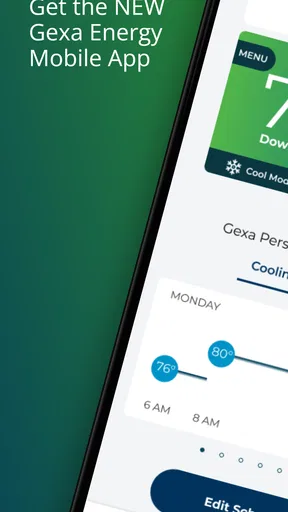
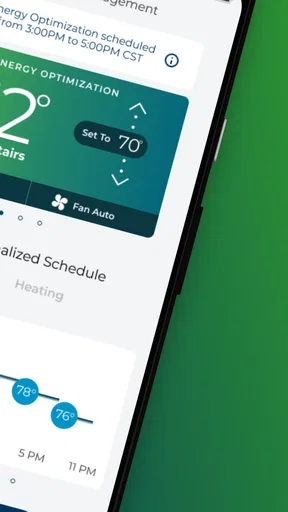
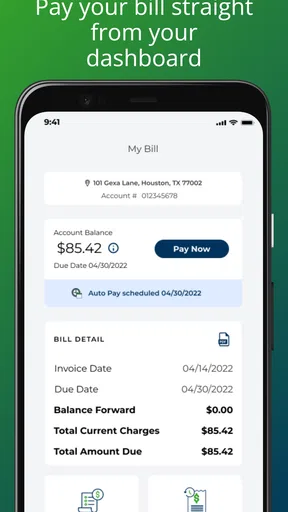
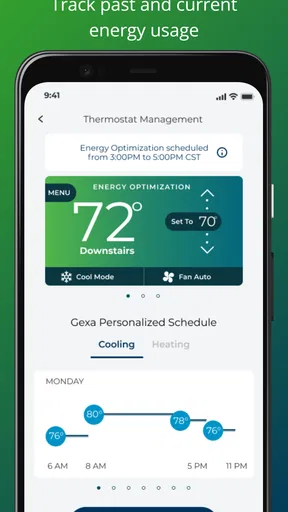
 Analysis by AppCompare
When I want to check an energy account while I’m away from home, a strong connection can make the difference between a useful visit and a screen that simply won’t load. Gexa Energy is a free House & Home app from Gexa Energy LP, designed for customers who want to keep an eye on household energy use and account tasks from a phone. I’d treat it as a practical companion to the provider’s usual account channels, rather than a standalone smart-home control hub.
Where a connection matters most
Energy apps are most useful when the information is current enough to guide a decision. If I’m checking a bill, looking at usage, or trying to understand whether a change in routine may affect the household total, I need the app to communicate with the account service. That makes connectivity part of the experience, not just a technical detail: a weak signal can interrupt a check at exactly the moment I want a quick answer.
For that reason, I’d use the app for short, purposeful visits when I have a reliable connection, rather than relying on it as an always-available monitor. It can help me make a habit of checking energy use, but I would not plan a time-sensitive household decision around data that has not finished loading. When I’m on the move, it’s sensible to confirm that the relevant screen has updated before drawing conclusions.
Useful in the rhythms of home life
The best fit is someone who already has a Gexa Energy account and wants a phone-based way to stay engaged with household energy. A quick check during a lunch break, a review after receiving a bill, or a look at usage before changing the thermostat can all make the app relevant without turning energy management into a project. Its House & Home focus makes most sense when the user is thinking about the home’s ongoing consumption, not controlling a collection of connected devices.
Here’s a realistic routine I’d try: after a hot afternoon when the air conditioning has been running more than usual, I’d open the app while connected to dependable Wi-Fi, check the account information available, and note whether the pattern looks different from my normal week. I’d then compare that with what actually changed at home—more people indoors, longer cooling hours, or a door left open—before deciding what to adjust. The app can prompt a useful question; it cannot tell me by itself which appliance or habit caused a change.
That distinction is important. A usage view is a starting point for investigation, not proof that one particular device is wasting power. If I want to test a habit, I’d change one thing at a time and compare later checks under similar conditions. That approach is more useful than reacting to a single reading or making several changes at once and then guessing which one mattered.
When a task stalls, keep the next step simple
Mobile account tools can feel unreliable when a page is slow, but a stalled screen does not automatically mean something is wrong with the account. I’d first check whether other apps can reach the internet, then switch between Wi-Fi and mobile data if available and reopen the relevant screen. For a payment or account change, I’d wait for a clear confirmation before trying again, so I don’t accidentally repeat an action because the connection paused.
Worth Reading Before You Choose

EA SPORTS FC Mobile 26 Is a Bigger Football Game, but It Takes Time

Flipboard Shows What News Apps Must Do Beyond the Feed

Switching to Android Auto Means Rethinking Your Driving Routine

Google Calendar Makes a Crowded Week Easier to Manage

Ludo King Makes the Most of the Minutes Between Plans

Baby Panda World Brings Quick Play to Modern Phones, but Its Game Library Feels Busy
If the same problem continues, it’s better to move to the provider’s customer-service route than keep tapping through a screen that is not responding. The app is most convenient when the connection and account access are behaving normally; it should not be the only route I rely on for an urgent billing issue. I’d keep the account details needed to identify myself accessible, and use a dependable connection before handling sensitive account tasks.
Be deliberate about mobile data
Anyone trying to conserve a limited mobile-data allowance can make the app part of a planned check-in instead of repeatedly opening it throughout the day. I’d review the account when I’m already on trusted Wi-Fi, especially if I’m comparing information across more than one screen. That keeps the experience intentional and avoids refreshing out of habit when there is no specific question to answer.
There is also a practical trade-off between convenience and confidence. A quick glance on a phone is handy, but if a number looks surprising, I’d give the screen time to load and revisit it on a stable connection before changing household plans. This is particularly useful when comparing days with different weather or occupancy, since those conditions can affect energy use independently of any single appliance.
Getting Started with Gexa Energy
First things first, downloading and setting up Gexa Energy is a walk in the park. Whether you’re on Android or iOS, the app is lightweight and installs in a snap. Once you open it, you’re greeted with a clean, intuitive interface. The design is modern, with a color scheme that’s easy on the eyes, which is great because nobody wants a headache when trying to save money, right?
User-Friendly Interface
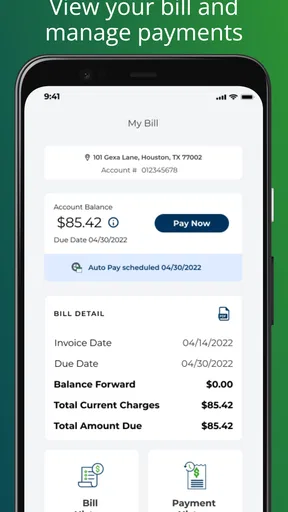
The app’s dashboard is where all the magic happens. It’s organized in a way that even my grandma could figure it out, and she still thinks Wi-Fi is a kind of coffee. You’ve got your current usage displayed front and center, and all the important options are just a tap away. Whether you want to check your bill, manage payments, or monitor your energy consumption, it’s all there under well-labeled sections.
Features That Shine
One feature I really dig is the real-time energy monitoring. You can literally see how much energy you’re using at any given moment. It’s like having a fitness tracker for your house. It’s super handy for identifying those sneaky appliances that are secretly energy vampires. Plus, there’s a handy budget tracker that lets you set goals and see if you’re on track to meet them.
If you’re into renewable energy, you’ll be pleased to know that the app also offers insights into how much of your energy is sourced from renewables. It’s a nice touch for the eco-conscious among us.
Notifications and Alerts
Nobody likes being caught off guard by a hefty bill. Luckily, the app’s notification system is on point. It sends you alerts when you’re nearing your budget limit or if there’s any unusual activity. It’s like having a digital butler that’s always got your back. You can customize these alerts to suit your needs, so you’re always in the loop but not overwhelmed with unnecessary notifications.
Support and Assistance
If you ever run into trouble, the app offers a comprehensive support section, complete with FAQs and a way to contact customer service directly. I had a minor hiccup with my payment method, and their response time was impressively quick. It’s reassuring to know that help is just a few taps away.
Why You Might Love It
All in all, Gexa Energy delivers on its promise of making energy management straightforward and stress-free. It’s perfect for those of us who want to keep a close eye on our energy usage without getting bogged down by technical jargon. Plus, the app’s emphasis on renewable energy is a win in my book.
Whether you’re tech-savvy or just starting to dip your toes into the world of smart home management, this app has something for everyone. It’s efficient, reliable, and most importantly, it saves you money while helping you become more environmentally conscious.
Compared with checking an energy account through a web browser, the phone app is better suited to quick, repeated check-ins; a browser may be more comfortable when I want to review account details on a larger screen. Compared with generic smart-home apps, this is the more relevant choice for provider-account tasks, but it is not a substitute for a dedicated device-control system. I’d skip it if I’m not a Gexa Energy customer, or if my main goal is to manage smart plugs, thermostats, and other equipment from one place.
The app is free, rated for Everyone, and has an average rating of 3.2 from around 2.9 thousand ratings, with about 428 written reviews. It has passed 100 thousand installs, was released on June 4, 2020, and its current version is 3.0.11, with Android 5.0 as the minimum system requirement. Those figures suggest a well-established utility app, though the rating also reminds me that a smooth experience may depend on individual account needs, device conditions, and connectivity.
Who benefits most—and what to expect
I’d recommend it to a Gexa customer who wants a convenient way to check household energy and handle routine account tasks without waiting to sit down at a computer. It is especially useful for people who are willing to make small, steady adjustments: reviewing usage after a change in schedule, setting a budget target, or checking an alert before a bill catches them by surprise. The value comes from returning to the information and acting on it, not from installing the app and expecting energy costs to fall automatically.
For a household with several people, it can also give the person managing the account a clearer place to follow energy-related details. A useful habit is to agree on one or two changes—such as adjusting cooling habits or turning off equipment that is not needed—then check later to see whether the overall pattern appears to shift. That avoids turning the dashboard into a source of blame when a bill changes for reasons the app cannot explain on its own.
Before relying on a phone for account management, I’d make sure I can sign in and reach the screens I use most while at home. I’d also keep a non-app way to contact the provider in mind for a payment issue that needs attention quickly. The app’s support section is convenient for ordinary questions, but a mobile interface is not always the best place to resolve a complicated account problem, especially if the connection is unstable.
My main reservation is that expectations need to stay grounded: usage information and alerts can help me notice patterns, but they do not replace careful comparisons or explain every fluctuation. Real-time views can be compelling, yet a momentary reading is less useful than a consistent routine of checking similar periods. For practical savings, I’d pair what I see with changes I can actually control at home, then review the results rather than assume every alert calls for immediate action.
A sensible fit for connected account management
Gexa Energy is at its best when I have a stable connection, a specific reason to check the account, and enough patience to interpret usage in context. Its strongest appeal is the convenience of bringing energy-related account information and household monitoring into a mobile routine, rather than making me treat every check as a separate administrative task. For someone who wants a provider-focused tool, that is a meaningful advantage over a general home app.
It is less compelling for someone who expects detailed appliance-by-appliance diagnosis, broad smart-home automation, or uninterrupted access regardless of network conditions. In those cases, a specialized energy monitor, a device maker’s app, or the provider’s other customer-service channels may be a better match for the particular job. I would not choose this app simply because I want a dashboard; I’d choose it because I use Gexa and want an easier way to stay attentive to my household account.
So, if you’re in the market for a new way to manage your energy, give Gexa Energy a shot. You might be surprised at how much you enjoy keeping tabs on your energy usage—who knew saving money could be this much fun?
Pros
- User-friendly interface for easy navigation.
- Real-time energy usage monitoring.
- Customizable alerts for energy savings.
- Integrated bill payment feature.
- 24/7 customer support availability.
Cons
- Limited to specific regions.
- Requires stable internet connection.
- No dark mode available.
- Occasional login issues reported.
- In-app advertisements can be intrusive.
FAQs for Gexa Energy
What features does the Gexa Energy app offer?
The Gexa Energy app provides users with a comprehensive suite of features designed for easy energy management. You can view and pay bills, check usage history, and receive notifications about your energy consumption. Additionally, the app offers tools for setting up automatic payments and customizing alerts to help manage your energy costs efficiently.
Is the Gexa Energy app available for both Android and iOS?
Yes, the Gexa Energy app is available for download on both Android and iOS platforms. Users can find the app on the Google Play Store for Android devices and the Apple App Store for iOS devices. This ensures that you can manage your energy usage conveniently, regardless of your device preference.
Does the Gexa Energy app support multiple accounts?
The Gexa Energy app allows users to manage multiple accounts seamlessly. This feature is particularly useful for individuals or businesses with several properties. You can switch between accounts effortlessly to view usage, pay bills, and monitor energy consumption for each location, all within a single app interface.
How secure is the Gexa Energy app?
Security is a top priority for the Gexa Energy app. The app employs advanced encryption protocols to protect your personal and financial information. Regular updates ensure that security measures are up-to-date, providing a secure environment for managing your energy accounts. Users can also enable features like biometric login for added security.
Can I use the Gexa Energy app to report outages?
Yes, the Gexa Energy app includes a feature for reporting outages directly from your device. This functionality enables users to quickly notify the company of any power issues, ensuring a swift response. The app also provides real-time updates on the status of reported outages, helping users stay informed about service restoration timelines.


